|
|
| Line 1: |
Line 1: |
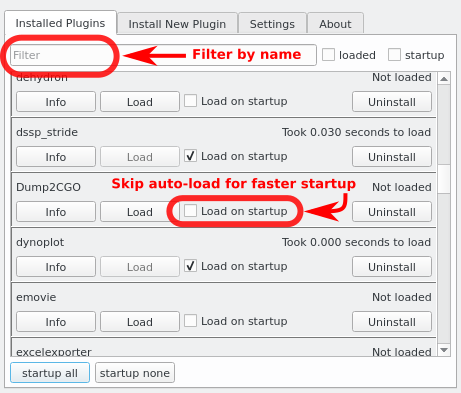
| Since version 1.5.0.5 PyMOL comes with a '''Plugin Manager''', which can be used to load plugins such as those in the [https://github.com/Pymol-Scripts/Pymol-script-repo# PyMOL Script Repo].<br> | | Since version 1.5.0.5 PyMOL comes with a '''Plugin Manager''', which can be used to load plugins such as those in the [https://github.com/Pymol-Scripts/Pymol-script-repo# PyMOL Script Repo].<br> |
|
| |
|
| =Manual Setup= | | == Features == |
| In the PyMOL menu naviagte to '''Plugins''' > '''Plugin Manager''' <br>
| |
| Here you can manually add directories or scripts that will be loaded upon startup.<br>
| |
| Older versions have a basic version of this manager: '''Plugin''' > '''Manage Plugins''', however, here the scripts need to be added individually.<br>
| |
| | |
| | |
| =Scripted setup during PyMOL launching= | |
| ===Creating run_on_startup.py===
| |
| '''run_on_startup.py''' can easily be created using a text editor such as notepad. The '''run_on_startup.py''' is handled similar to [[Pymolrc|pymolrc]] files and is executed every time PyMOL launches. An important distinction is that '''run_on_startup.py''' is executed before the [[Pymolrc|pymolrc]] files and is purely written in python.
| |
| | |
| The recommended location of '''run_on_startup.py''' is the [[PYMOL_PATH|PyMOL home directory]]. An advantage is that should PyMOL be installed on a computer with several users, this will be run for all users, while the pymolrc files can be individual (e.g. in the USER directory).
| |
| | |
| <syntaxhighlight lang="python">
| |
| #this can be copy-pasted to create run_on_startup.py in the home directory
| |
|
| |
| # Add paths to sys.path so PyMOL can find modules and scripts
| |
| import sys
| |
| import os
| |
|
| |
| pymol_git = os.path.realpath(os.path.join(os.environ['PYMOL_PATH'], 'Pymol-script-repo'))
| |
|
| |
| os.environ['PYMOL_GIT_MOD'] = os.path.join(pymol_git,'modules')
| |
| sys.path.append(pymol_git)
| |
| sys.path.append(os.environ['PYMOL_GIT_MOD'])
| |
|
| |
| # Make setting changes to Plugin Manager
| |
| try: # in case the PyMOL is older and doe not have the module pymol.plugins
| |
| import pymol.plugins
| |
|
| |
| #THIS IS WHERE THE PATH IS ADDED TO INITIALIZE PLUGINS USING THE PLUGIN MANAGER
| |
| pymol.plugins.set_startup_path([os.path.join(pymol_git, 'plugins'), os.path.join(sys.prefix, 'Lib', 'site-packages', 'pmg_tk', 'startup')])
| |
|
| |
| pymol.plugins.preferences = {'instantsave': False, 'verbose': False}
| |
| pymol.plugins.autoload = {'apbs_tools': False}
| |
| pymol.plugins.preferences = {'instantsave': True, 'verbose': False}
| |
| # This can be used to trace if PyMOL executed the file correctly
| |
| print 'Loaded run_on_stratup.py'
| |
| except:
| |
| print 'NB! Plugin Manager not present!'
| |
| </syntaxhighlight>
| |
| | |
| Note that this block will also add the '''Pymol-script-repo''' and the subfolder '''Pymol-script-repo/modules''' to PyMOL's search path. This is something that is required in earlier PyMOL version to allow import of scripts. Thus this version of '''run_on_startup.py''' can be used for older versions, too.
| |
| | |
| Note that the settings specific for the ''new'' version of the '''Plugin Manager''' will not have an effect.
| |
| | |
| ===What if the 'Pymol-script-repo' is not in the PyMOL directory?===
| |
| If the '''Pymol-script-repo''' is located somewhere else the first section of the '''run_on_startup.py''' file will be different.<br>
| |
| E.g. in the USER directory:
| |
| <syntaxhighlight lang="python">
| |
| # This would replace the first section in '''run_on_startup.py'''.
| |
| import sys
| |
| import os
| |
| | |
| pymol_git = os.path.abspath(os.path.join(os.path.expanduser('~'), 'Pymol-script-repo'))
| |
| | |
| os.environ['PYMOL_GIT_MOD'] = os.path.join(pymol_git,'modules')
| |
| sys.path.append(pymol_git)
| |
| sys.path.append(os.environ['PYMOL_GIT_MOD'])
| |
| </syntaxhighlight>
| |
| | |
| E.g. in any other path:
| |
| <syntaxhighlight lang="python">
| |
| # This would replace the first section in '''run_on_startup.py'''.
| |
| import sys
| |
| import os
| |
| | |
| pymol_git = os.path.realpath('D:/MY/RANDOM/PATH/TO/Pymol-script-repo') # Adjust this line
| |
| # Note the slash ('/') instead of backslash ('\'), beware Windows users!
| |
| | |
| os.environ['PYMOL_GIT_MOD'] = os.path.join(pymol_git,'modules')
| |
| sys.path.append(pymol_git)
| |
| sys.path.append(os.environ['PYMOL_GIT_MOD'])
| |
| </syntaxhighlight>
| |
|
| |
|
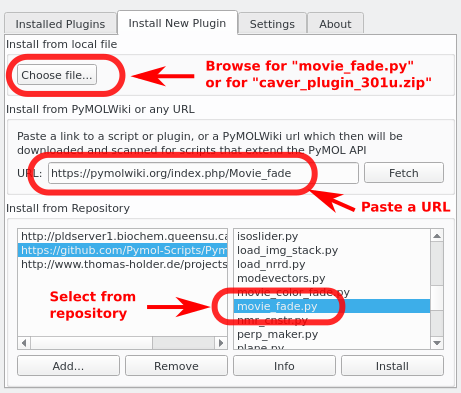
| | * Install/Uninstall plugins |
| | * Disable plugins and load them on demand to optimize PyMOL's startup time |
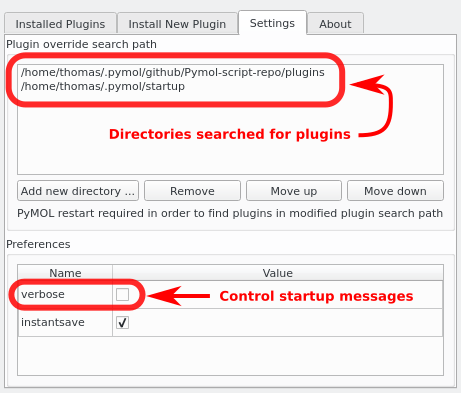
| | * Configure the plugin search path |
|
| |
|
| ===Appending additional paths to the Plugin Manager=== | | ===Appending additional paths to the Plugin Manager=== |
| Should your scripts be located in several alternative locations, it is possible to append additional directories to the '''Plugin Manager'''.<br> | | Should your scripts be located in several alternative locations, it is possible to append additional directories to the '''Plugin Manager'''.<br> |
| In the example below, a directory called 'plugins_private', which is located in the PyMOL directory, is added to the Plugin Manger.<br>
| |
| Should the folder be somewhere else the example below can be adjusted as outlined above.<br>
| |
| <syntaxhighlight lang="python">
| |
| #copy paste into PyMOL's command line or into the pymolrc
| |
|
| |
| python
| |
| import os
| |
| import sys
| |
| import pymol.plugins # Note that this requires the 'new' Plugin Manager
| |
|
| |
| PRIVATE_PATH=os.path.realpath(os.path.join(os.environ['PYMOL_PATH'], 'plugins_private'))
| |
| startupdirectories=list(pymol.plugins.get_startup_path(True))
| |
| if PRIVATE_PATH not in startupdirectories:
| |
| startupdirectories.append(PRIVATE_PATH)
| |
| if PRIVATE_PATH not in sys.path:
| |
| sys.path.append(PRIVATE_PATH)
| |
| pymol.plugins.set_startup_path(startupdirectories)
| |
| python end
| |
| </syntaxhighlight>
| |
|
| |
| Note that the '''Plugin Manager''' supports loading entire folders with scripts ('modules').<br>
| |
| If you have such a folder, make sure it contains a file called '__init__.py', which can be empty.
| |
|
| |
|
| | : Plugin > Plugin Manager > Settings > Add new directory... |
|
| |
|
| =If you don't have a Plugin Manager= | | == Screenshots == |
| If you are running an older PyMOL without '''Plugin Manager''' you can either upgrade to the newest version or load plugins the traditional way. <br>
| |
| For detailed instructions see: [[Git install scripts]]<br>
| |
| Essentially, make sure that the folder is added to PyMOL's search paths.
| |
| <syntaxhighlight lang="python">
| |
| import sys
| |
| import os
| |
| pymol_git = os.path.realpath(os.path.join(os.environ['PYMOL_PATH'], 'Pymol-script-repo'))
| |
| sys.path.append(pymol_git)
| |
| </syntaxhighlight>
| |
| Import a plugin manually:
| |
| <syntaxhighlight lang="python">
| |
| # EXAMPLE
| |
| delete all
| |
| frag LYS
| |
| cgo_arrow name N, name O # will not work if 'cgo_arrow' is not loaded
| |
|
| |
|
| import cgo_arrow # PyMOL will look for this file and load it
| | [[Image:plugin_manager_installed.png]] |
| cgo_arrow name N, name O # should work if it is loaded
| | [[Image:plugin_manager_install_new.png]] |
| </syntaxhighlight>
| | [[Image:plugin_manager_settings.png]] |
|
| |
|
| =SEE ALSO= | | == See Also == |
| [[Git install scripts]]
| |
|
| |
|
| | * [[Pymol-script-repo]] |
|
| |
|
| [[Category:Launching]] | | [[Category:Launching]] |
| [[Category:Plugins]] | | [[Category:Plugins]] |
Since version 1.5.0.5 PyMOL comes with a Plugin Manager, which can be used to load plugins such as those in the PyMOL Script Repo.
- Install/Uninstall plugins
- Disable plugins and load them on demand to optimize PyMOL's startup time
- Configure the plugin search path
Appending additional paths to the Plugin Manager
[edit]Should your scripts be located in several alternative locations, it is possible to append additional directories to the Plugin Manager.
- Plugin > Plugin Manager > Settings > Add new directory...