Orthoscopic: Difference between revisions
No edit summary |
Exchanged image files with a more instructive example |
||
| Line 7: | Line 7: | ||
== Examples == | == Examples == | ||
<gallery> | <gallery> | ||
Image: | Image:orthoon2.png|orthoscopic on (perspective off) | ||
Image: | Image:orthooff2.png |orthoscopic off (perspective on) | ||
For many images, the difference is hardly visible. | |||
</gallery> | </gallery> | ||
<gallery> | |||
Image:orthoon.png|orthoscopic on (perspective off) | |||
Image:orthooff.png |orthoscopic off (perspective on) | |||
Especially when straight features parallel to the z axis are shown, the effect may be large. | |||
</gallery> | |||
== Syntax == | == Syntax == | ||
Revision as of 09:25, 8 October 2010
Overview
orthoscopic turns on and off the perspective handling. Turning on orthoscopic rendering removes the effects of perspective. To turn on perspective rendering see, the Field of View command.
Performance Notes
Turning on orthoscopic rendering improves the rendering speed by a factor of 2x-4x! So, if you have large images, or are rendering a movie that does not need perspective in the images, try turning off perspective by setting the orthoscopic flag to 1.
Examples
-
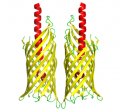 orthoscopic on (perspective off)
 -
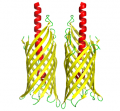 orthoscopic off (perspective on)


-
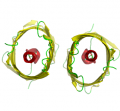 orthoscopic on (perspective off)
 -
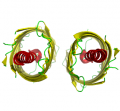 orthoscopic off (perspective on)


Syntax
set orthoscopic, on
set orthoscopic, off