Orthoscopic
Overview
orthoscopic turns on and off the perspective handling. Turning on orthoscopic rendering removes the effects of perspective. To adjust perspective rendering see, the Field of View command.
Performance Notes
Turning on orthoscopic rendering improves the rendering speed by a factor of 2x-4x! So, if you have large images, or are rendering a movie that does not need perspective in the images, try turning off perspective by setting orthoscopic to 1.
Examples
-
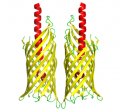 orthoscopic on (perspective off)
 -
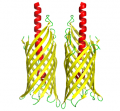 orthoscopic off (perspective on)


-
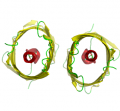 orthoscopic on (perspective off)
 -
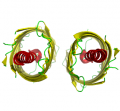 orthoscopic off (perspective on)


Syntax
set orthoscopic, on
set orthoscopic, off