Transparency: Difference between revisions
No edit summary |
|||
| Line 34: | Line 34: | ||
set transparency, 0.65, i. 1-100 | set transparency, 0.65, i. 1-100 | ||
</source> | </source> | ||
[[Category:Settings|Transparency]] | |||
[[Category:Publication_Quality|Transparency]] | |||
Revision as of 21:18, 2 November 2007
Overview
Transparency is used to adjust the transparency of Surfaces. (For other transparencies in PyMOL, see Cartoon Transparency, Sphere Transparency, and Stick Transparency.
Usage
set transparency, F, selection
where F is a floating point number in the range [0.0 - 1.0], where selection is the selected surface to apply the change to (for examples, see below).
For the value of F, 1.0 will be an invisible and 0.0 a completely solid surface.
Examples
Whole Surface
Change the transparency of the whole surface to 50%.
# show all surfaces with 50% transparency.
set transparency, 0.5
-
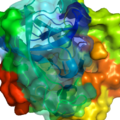 Image showing partial surface transparencies
 -
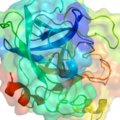 Image showing 100% of the surface with 65% transparency.


Selected Surface Elements
Simple example showing how to do partial surface transparency
# load a random protein
fetch 1rty

# set the partial transparency for the selected residues
set transparency, 0.65, i. 1-100