FocalBlur: Difference between revisions
Created page with "==Description== This script creates fancy figures by introducing a focal blur to the image. The object at the origin will be in focus. ===Usage=== load the script using the ..." |
|||
| (16 intermediate revisions by 4 users not shown) | |||
| Line 1: | Line 1: | ||
{{Infobox script-repo | |||
|type = script | |||
|filename = focal_blur.py | |||
|author = [[User:Jarl.Underhaug|Jarl Underhaug]] | |||
|license = - | |||
}} | |||
[[Image:StylizedFocalBlur.png|550px|right]] | |||
==Description== | ==Description== | ||
This script creates fancy figures by introducing a focal blur to the image. The object at the origin will be in focus. | This script creates fancy figures by introducing a focal blur to the image. The object at the origin will be in focus. | ||
===Usage=== | ===Usage=== | ||
Load the script using the [[run]] command. Execute the script using PyMOL syntax: | |||
<source lang="python"> | |||
FocalBlur aperture=2.0,samples=20,ray=1 | |||
</source> | |||
or using python syntax: | |||
<source lang="python"> | <source lang="python"> | ||
FocalBlur(aperture=2.0,samples= | FocalBlur(aperture=2.0,samples=20,ray=1) | ||
</source> | </source> | ||
For additional options, see the script comments. | For additional options, see the script comments. | ||
| Line 17: | Line 31: | ||
* When using raytracing, the image creation will take ''n'' times longer than normal, where ''n'' is the number of samples. | * When using raytracing, the image creation will take ''n'' times longer than normal, where ''n'' is the number of samples. | ||
* The aperture is related to the aperture on a camera, and is inversely proportional to the f-number. | |||
* The aperture is | |||
===Bugs=== | |||
* FocalBlur uses the Python Image Library (PIL), a necessary components of PIL is missing in the Windows version of PyMOL | |||
* There is a bug when not using ray tracing with the free version of PyMOL | |||
===Examples=== | ===Examples=== | ||
<gallery perrow=3 widths=300 heights=240> | |||
Image:FocalBlur_a1.0_r1.png|FocalBlur aperture=1,samples=100,ray=1 | |||
Image:FocalBlur_a2.0_r1.png|FocalBlur aperture=2,samples=100,ray=1 | |||
Image:FocalBlur_a4.0_r1.png|FocalBlur aperture=4,samples=400,ray=1 | |||
Image:FocalBlur_a4.0_r0.png|FocalBlur aperture=4,samples=400,ray=0 | |||
Image:Focal_blur _ex6.png | |||
Image:Focal blur_ex_ap3.png | |||
Image:Focal blur_ex_ap3_mode1.png | |||
Image:Focal blur_ex_ap3_mode2.png | |||
Image:Focal blur_ex_ap3_mode3.png | |||
</gallery> | |||
==Script== | ==Script== | ||
Load the script using the [[run]] command | |||
<source lang="python"> | <source lang="python"> | ||
from pymol import cmd | from pymol import cmd | ||
from tempfile import mkdtemp | from tempfile import mkdtemp | ||
from shutil import rmtree | from shutil import rmtree | ||
from math import sin,cos,pi | from math import sin,cos,pi,sqrt | ||
from PIL import Image | |||
def FocalBlur(aperture=2.0,samples=10,ray=0,width=0,height=0): | |||
def FocalBlur(aperture=2.0,samples=10, | |||
''' | ''' | ||
DESCRIPTION | |||
Creates fancy figures by introducing a focal blur to the image. The object | |||
at the origin will be in focus. | |||
AUTHOR | |||
Jarl Underhaug | |||
University of Bergen | |||
jarl_dot_underhaug_at_gmail_dot_com | |||
Updates by Jason Vertrees and Thomas Holder | |||
USAGE | |||
FocalBlur aperture=float, samples=int, ray=0/1, width=int, height=int | |||
EXAMPELS | |||
FocalBlur aperture=1, samples=100 | |||
FocalBlur aperture=2, samples=100, ray=1, width=600, height=400 | |||
''' | ''' | ||
# | # Formalize the parameter types | ||
ray = (ray in ("True", "true", 1, "1")) | |||
aperture, samples = float(aperture), int(samples) | |||
width, height = int(width), int(height) | |||
# Create a temporary directory | # Create a temporary directory | ||
tmpdir = mkdtemp() | tmpdir = mkdtemp() | ||
| Line 78: | Line 99: | ||
light = [float(s) for s in light.split(',')] | light = [float(s) for s in light.split(',')] | ||
view = cmd.get_view() | view = cmd.get_view() | ||
# Rotate the protein and the light in order to create the blur | # Rotate the protein and the light in order to create the blur | ||
for frame in range(samples): | for frame in range(samples): | ||
# Angles to rotate protein and light | # Angles to rotate protein and light | ||
# Populate angles as Fermat's spiral | |||
y | theta = frame * pi * 110.0/144.0 | ||
radius = 0.5 * aperture * sqrt(frame/float(samples-1)) | |||
x = cos(theta) * radius | |||
y = sin(theta) * radius | |||
xr = x/180.0*pi | xr = x/180.0*pi | ||
yr = y/180.0*pi | yr = y/180.0*pi | ||
# Rotate the protein | # Rotate the protein | ||
cmd.turn('x',x) | cmd.turn('x',x) | ||
cmd.turn('y',y) | cmd.turn('y',y) | ||
# Rotate the light | # Rotate the light | ||
ly = light[1]*cos(xr)-light[2]*sin(xr) | ly = light[1]*cos(xr)-light[2]*sin(xr) | ||
| Line 97: | Line 121: | ||
lz = lz*cos(yr)-lx*sin(yr) | lz = lz*cos(yr)-lx*sin(yr) | ||
cmd.set('light',[lx,ly,lz]) | cmd.set('light',[lx,ly,lz]) | ||
curFile = "%s/frame-%04d.png" % (tmpdir,frame) | |||
print "Created frame %i/%i (%0.0f%%)" % (frame+1,samples,100*(frame+1)/samples) | |||
# Save the image | # Save the image to temporary directory | ||
if ray: | |||
cmd.ray(width,height) | |||
cmd.png(curFile) | |||
else: | |||
cmd.png(curFile,quiet=1) | |||
# Create the average/blured image | |||
try: | |||
avg = Image.blend(avg,Image.open(curFile),1.0/(frame+1)) | |||
except: | |||
avg = Image.open(curFile) | |||
# Return the protein and the light to the original orientation | # Return the protein and the light to the original orientation | ||
cmd.set('light',light) | cmd.set('light',light) | ||
cmd.set_view(view) | cmd.set_view(view) | ||
# | # Load the blured image | ||
avg.save('%s/avg.png' % (tmpdir)) | |||
cmd.load('%s/avg.png' % (tmpdir)) | |||
cmd.load('%s/ | |||
# Delete the temporary files | # Delete the temporary files | ||
rmtree(tmpdir) | rmtree(tmpdir) | ||
cmd.extend('FocalBlur', FocalBlur) | |||
</source> | </source> | ||
Latest revision as of 07:52, 17 July 2014
| Type | Python Script |
|---|---|
| Download | focal_blur.py |
| Author(s) | Jarl Underhaug |
| License | - |
| This code has been put under version control in the project Pymol-script-repo | |

Description
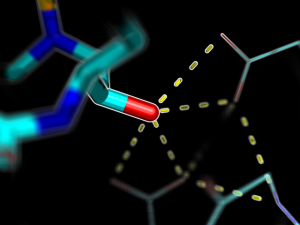
This script creates fancy figures by introducing a focal blur to the image. The object at the origin will be in focus.
Usage
Load the script using the run command. Execute the script using PyMOL syntax:
FocalBlur aperture=2.0,samples=20,ray=1
or using python syntax:
FocalBlur(aperture=2.0,samples=20,ray=1)
For additional options, see the script comments.
Notes
- When using raytracing, the image creation will take n times longer than normal, where n is the number of samples.
- The aperture is related to the aperture on a camera, and is inversely proportional to the f-number.
Bugs
- FocalBlur uses the Python Image Library (PIL), a necessary components of PIL is missing in the Windows version of PyMOL
- There is a bug when not using ray tracing with the free version of PyMOL
Examples
-
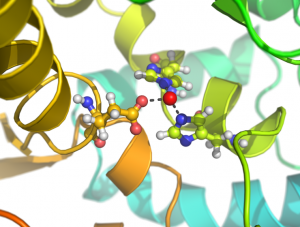 FocalBlur aperture=1,samples=100,ray=1
 -
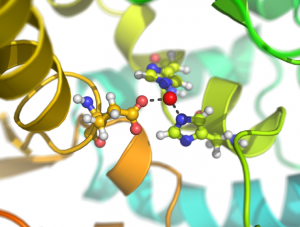 FocalBlur aperture=2,samples=100,ray=1
 -
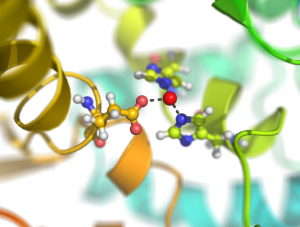 FocalBlur aperture=4,samples=400,ray=1
 -
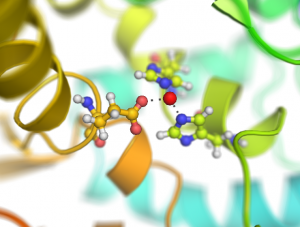 FocalBlur aperture=4,samples=400,ray=0
 -
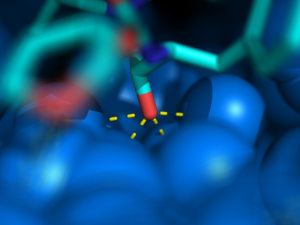
-
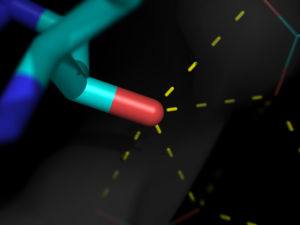
-
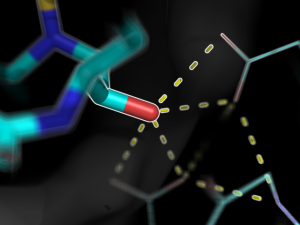
-
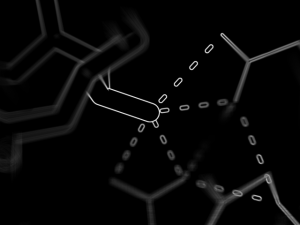
-


Script
Load the script using the run command
from pymol import cmd
from tempfile import mkdtemp
from shutil import rmtree
from math import sin,cos,pi,sqrt
from PIL import Image

def FocalBlur(aperture=2.0,samples=10,ray=0,width=0,height=0):
    '''
DESCRIPTION

    Creates fancy figures by introducing a focal blur to the image. The object
    at the origin will be in focus.

AUTHOR

    Jarl Underhaug
    University of Bergen
    jarl_dot_underhaug_at_gmail_dot_com

    Updates by Jason Vertrees and Thomas Holder

USAGE

    FocalBlur aperture=float, samples=int, ray=0/1, width=int, height=int

EXAMPELS

    FocalBlur aperture=1, samples=100
    FocalBlur aperture=2, samples=100, ray=1, width=600, height=400
    '''

    # Formalize the parameter types
    ray = (ray in ("True", "true", 1, "1"))
    aperture, samples = float(aperture), int(samples)
    width, height = int(width), int(height)

    # Create a temporary directory
    tmpdir = mkdtemp()

    # Get the orientation of the protein and the light
    light = cmd.get('light')[1:-1]
    light = [float(s) for s in light.split(',')]
    view = cmd.get_view()

    # Rotate the protein and the light in order to create the blur
    for frame in range(samples):
        # Angles to rotate protein and light
        # Populate angles as Fermat's spiral
        theta = frame * pi * 110.0/144.0
        radius = 0.5 * aperture * sqrt(frame/float(samples-1))
        x = cos(theta) * radius
        y = sin(theta) * radius
        xr = x/180.0*pi
        yr = y/180.0*pi

        # Rotate the protein
        cmd.turn('x',x)
        cmd.turn('y',y)

        # Rotate the light
        ly = light[1]*cos(xr)-light[2]*sin(xr)
        lz = light[2]*cos(xr)+light[1]*sin(xr)
        lx = light[0]*cos(yr)+lz*sin(yr)
        lz = lz*cos(yr)-lx*sin(yr)
        cmd.set('light',[lx,ly,lz])

        curFile = "%s/frame-%04d.png" % (tmpdir,frame)
        print "Created frame %i/%i (%0.0f%%)" % (frame+1,samples,100*(frame+1)/samples)

        # Save the image to temporary directory
	if ray:
                cmd.ray(width,height)
                cmd.png(curFile)
	else:
        	cmd.png(curFile,quiet=1)

        # Create the average/blured image
        try:
            avg = Image.blend(avg,Image.open(curFile),1.0/(frame+1))
        except:
            avg = Image.open(curFile)

        # Return the protein and the light to the original orientation
        cmd.set('light',light)
        cmd.set_view(view)

    # Load the blured image
    avg.save('%s/avg.png' % (tmpdir))
    cmd.load('%s/avg.png' % (tmpdir))

    # Delete the temporary files
    rmtree(tmpdir)

cmd.extend('FocalBlur', FocalBlur)