Show: Difference between revisions
No edit summary |
Hongbo zhu (talk | contribs) →Example: add hide nonpolar hydro. Derived by logging menu item (H->hydrogens->nonpolar) |
||
| Line 59: | Line 59: | ||
hide everything, ele h | hide everything, ele h | ||
show lines, ele h and neighbor (ele n+o) | show lines, ele h and neighbor (ele n+o) | ||
# hide nonpolar hydrogens | |||
hide (h. and (e. c extend 1)) | |||
</source> | </source> | ||
Revision as of 12:06, 11 October 2012
Show displays atom and bond representations for certain selections.
Details
-
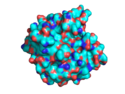 Example of a shown surface.
 -
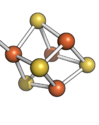 Ball and sticks shown.
 -
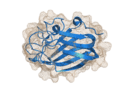 A cartoon inside a mesh shown.


The Show command, is one of the most often used commands in PyMOL. For example, you can show certain atoms as Lines or Sticks or Cartoons or any of the following representations:
USAGE
show
show reprentation [,object]
show reprentation [,(selection)]
show (selection)
PYMOL API
cmd.show( string representation="", string selection="" )
EXAMPLES
Example
# show the backbone using lines.
show lines,(name ca or name c or name n)
Example
# show the ribbon representation for all objects
show ribbon
Example
# show all hetero atoms as spheres
show spheres, het
Example
# show only polar hydrogens
hide everything, ele h
show lines, ele h and neighbor (ele n+o)
# hide nonpolar hydrogens
hide (h. and (e. c extend 1))
NOTES
selection can be an object name.
show alone will turn on lines and nonbonded for all bonds.
show cell will show the triclinic unit cell, provided it's described in the PDB. For cell packing, you need a script. See The Script Library or Robert Campbell's Site
SEE ALSO
Hide, Enable, Disable, Lines, Cartoon, Spheres, Mesh, Ribbon, Sticks, Dots, Surface, Label, Extent, Slice, Cell, Select, Show_as