Cartoon dumbbell radius: Difference between revisions
Created new settings page for cartoon_dumbbell_radius |
mNo edit summary |
||
| Line 13: | Line 13: | ||
Image:cartoon_dumbbell_radius_0.png|cartoon_dumbbell_radius 0 | Image:cartoon_dumbbell_radius_0.png|cartoon_dumbbell_radius 0 | ||
Image:cartoon_dumbbell_radius_0.1.png|cartoon_dumbbell_radius 0.1 | Image:cartoon_dumbbell_radius_0.1.png|cartoon_dumbbell_radius 0.1 | ||
Image:cartoon_dumbbell_length_1.6.png|cartoon_dumbbell_radius 0.15 | Image:cartoon_dumbbell_length_1.6.png|cartoon_dumbbell_radius 0.15 (default) | ||
Image:cartoon_dumbbell_radius_0.4.png|cartoon_dumbbell_radius 0.4 | Image:cartoon_dumbbell_radius_0.4.png|cartoon_dumbbell_radius 0.4 | ||
</gallery> | </gallery> | ||
Revision as of 13:16, 27 November 2006
Overview
Only relavent when fency helices is turned on
set cartoon_dumbbell_radius defines the radius of the dumbbell ends when the fancy helices setting has been engaged
Setting to 0.1 eliminates the dumbbell shape with other settings to defaults, whereas setting <0.1 reveals interior space of the fancy helix
Syntax
set cartoon_dumbbell_radius, <number> #default setting is 0.15
Example
-
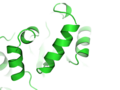 cartoon_dumbbell_radius 0
 -
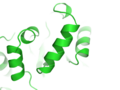 cartoon_dumbbell_radius 0.1
 -
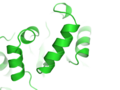 cartoon_dumbbell_radius 0.15 (default)
 -
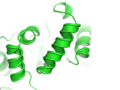 cartoon_dumbbell_radius 0.4


