|
|
| (11 intermediate revisions by 2 users not shown) |
| Line 1: |
Line 1: |
| THIS PAGE IS UNDERGOING RAPID CHANGES.<br>
| | {{Infobox script-repo |
| PLEASE KEEP REFRESHING YOUR BROWSER's CACHE TO DISPLAY RECENT CHANGES (SHIFT-RELOAD in Firefox).
| | |type = Python Module |
| | |filename = scripts/colorbyrmsd.py |
| | |author = [[User:Shiven|Shivender Shandilya]], [[User:Inchoate|Jason Vertrees]], [[User:Speleo3|Thomas Holder]] |
| | |license = BSD-2-Clause |
| | }} |
| | |
| == Introduction == | | == Introduction == |
| An attempt to perform a coloring of two structures by RMS deviation as calculated by PyMol's internal [[Rms_Cur]] command.
| | This script allows you to color two structures by Root Mean Square Deviation (RMSD). |
| | The distances between aligned C-alpha atom pairs are stored as B-factors of these residues, which are colored by a color spectrum, with blue specifying the minimum pairwise RMSD and red indicating the maximum. |
| | Unaligned residues are colored gray. |
| | |
| | == Usage == |
| | |
| | colorbyrmsd mobile, target [, doAlign [, doPretty [, guide [, method ]]]] |
| | |
| | == Arguments == |
|
| |
|
| == Code == | | * '''mobile''' = string: atom selection for mobile atoms |
| This is new code, modified from the work done by Jason and myself.<br>
| | * '''target''' = string: atom selection for target atoms |
| If you use the option '''doPretty=T''', the residues NOT used for alignment/superposition are now colored '''white'''.<br>
| | * '''doAlign''' = 0 or 1: Superpose selections before calculating distances {default: 1} |
| Please test and see if it works (somewhat) better. ''--[[User:Shiven|shiven]] 19:38, 16 July 2009 (UTC)''
| | * '''doPretty''' = 0 or 1: Show nice representation and colors {default: 1} |
| | * '''guide''' = 0 or 1: Only use C-alpha atoms {default: 1} |
| | * '''method''' = align or super: Method to match atoms {default: super} |
|
| |
|
| ==== Examples ====
| | == Examples == |
| <source lang="python"> | | <source lang="python"> |
| # example #1 | | # example #1 |
| colorByRMSD 1cbs, 1hmt, doAlign=True, doPretty=T
| | colorbyrmsd 1cbs, 1hmt, doAlign=1, doPretty=1 |
| # example #2 | | # example #2 |
| colorByRMSD 1eaz, 1fao, doAlign=True, doPretty=T
| | colorbyrmsd 1eaz, 1fao, doAlign=1, doPretty=1 |
| </source> | | </source> |
|
| |
|
| <gallery heights="300px" widths="300px"> | | <gallery heights="300px" widths="300px"> |
| Image:ColorByRMSD_1cbs_1hmt.png|1cbs and 1hmt aligned and colored by RMSD. Dark blue is good alignment, higher deviations are in orange/yellow/red. | | Image:ColorByRMSD_1cbs_1hmt.png|1cbs and 1hmt aligned and colored by RMSD. Dark blue is good alignment, higher deviations are in orange/yellow/red. Residues not used for alignment are colored white. |
| Image:ColorByRMSD_1eaz_1fao.png|1eaz and 1fao aligned and colored by RMSD. Dark blue is good alignment, higher deviations are in orange/yellow/red. | | Image:ColorByRMSD_1eaz_1fao.png|1eaz and 1fao aligned and colored by RMSD. Dark blue is good alignment, higher deviations are in orange/yellow/red. Residues not used for alignment are colored white. |
| </gallery> | | </gallery> |
|
| |
| <source lang="python">
| |
| """
| |
| --- ColorByRMSD: RMSD based coloring ---
| |
| Authors : Shivender Shandilya; Jason Vertrees
| |
| Program : ColorByRMSD
| |
| Date : July 2009
| |
| Version : 0.0.3 (very alpha!)
| |
| Mail : firstname.lastname@umassmed.edu
| |
|
| |
| Keywords: color rms rmsd colorbyrms colorbyrmsd
| |
| ----------------------------------------------------------------------
| |
| Reference:
| |
| This email from Warren - http://www.mail-archive.com/pymol-users@lists.sourceforge.net/msg07078.html
| |
| Literature:
| |
| DeLano, W.L. The PyMOL Molecular Graphics System (2002) DeLano Scientific, San Carlos, CA, USA. http://www.pymol.org
| |
| ----------------------------------------------------------------------
| |
| """
| |
|
| |
| import pymol
| |
| import cmd
| |
| from pymol import stored
| |
|
| |
| def strTrue(p):
| |
| return p[0].upper() == "T"
| |
|
| |
| # The main function that assigns "cur_rms" as the new b-factor
| |
| def rmsUpdateB(objA, alnAri, objB, alnBri):
| |
| # don't need the *10 -- PyMOL scales things for us.
| |
| for x in range(len(alnAri)):
| |
| s1 = objA + " and n. CA and i. " + alnAri[x]
| |
| s2 = objB + " and n. CA and i. " + alnBri[x]
| |
| rmsd = cmd.rms_cur(s1, s2, matchmaker=4)
| |
| cmd.alter( s1, "b = " + str(rmsd))
| |
| cmd.alter( s2, "b = " + str(rmsd))
| |
| cmd.sort(objA); cmd.sort(objB)
| |
|
| |
|
| |
| def colorByRMSD(objSel1, objSel2, doAlign="True", doPretty=None):
| |
| """
| |
| colorByRMSD -- align two structures and show the structural deviations in
| |
| color to more easily see variable regions.
| |
|
| |
| PARAMS
| |
|
| |
| objSel1 (valid PyMOL object or selection)
| |
| The first object to align.
| |
|
| |
| objSel2 (valid PyMOL object or selection)
| |
| The second object to align
| |
|
| |
| doAlign (boolean, either True or False)
| |
| Should this script align your proteins or just leave them where they
| |
| are? If doAlign=True then your original proteins are aligned. If
| |
| doAlign=False, then they are not. Regardless, the b-factors are
| |
| changed.
| |
| DEFAULT: True
| |
|
| |
| doPretty (boolean, either True or False)
| |
| If doPretty=True then a simple representation is created to high-
| |
| light the differences. If False, then no change is done to the
| |
| structure.
| |
| DEFAULT: None
| |
|
| |
| RETURNS
| |
| None.
| |
|
| |
| SIDE-EFFECTS
| |
| Modified the b-factor columns in your original proteins.
| |
|
| |
| """
| |
| # create backup copies; names starting with _ (underscores) are
| |
| # hidden by PyMOL
| |
| tObj1, tObj2, aln = "__tempObj1", "__tempObj2", "__aln"
| |
|
| |
| if strTrue(doAlign):
| |
| # perform the alignment
| |
| cmd.create( tObj1, objSel1 )
| |
| cmd.create( tObj2, objSel2 )
| |
| # cmd.align( tObj1, tObj2, object=aln )
| |
| cmd.super( tObj1, tObj2, object=aln )
| |
| # bug -- every other call undoes this...
| |
| cmd.matrix_copy(tObj1, objSel1)
| |
| else:
| |
| # perform the alignment
| |
| cmd.create( tObj1, objSel1 )
| |
| cmd.create( tObj2, objSel2 )
| |
| # cmd.align( tObj1, tObj2, object=aln )
| |
| cmd.super( tObj1, tObj2, object=aln )
| |
|
| |
| # cmd.alter( tObj1 + " or " + tObj2, "b=-10")
| |
| # Now modify the B-factor columns of the original objects,
| |
| # so as to later identify the residues NOT used for alignment
| |
| cmd.alter( objSel1 + " or " + objSel2, "b=-10")
| |
| cmd.alter( tObj1 + " or " + tObj2, "chain='A'")
| |
| cmd.alter( tObj1 + " or " + tObj2, "segi='A'")
| |
| # update PyMOL;
| |
| # one of these should do the trick
| |
| cmd.refresh(); cmd.rebuild(); cmd.sort(tObj1); cmd.sort(tObj2)
| |
|
| |
| # Get the residue identifiers from the aln object
| |
| stored.alnAres, stored.alnBres = [], []
| |
| cmd.iterate(tObj1 + " and n. CA and " + aln, "stored.alnAres.append(resi)")
| |
| cmd.iterate(tObj2 + " and n. CA and " + aln, "stored.alnBres.append(resi)")
| |
|
| |
| #print "Length of alnAres using 'super': "+str(len(stored.alnAres))
| |
| #print "Length of alnBres using 'super': "+str(len(stored.alnBres))
| |
|
| |
| # reset the b-factors for each object
| |
| rmsUpdateB(tObj1,stored.alnAres,tObj2,stored.alnBres)
| |
|
| |
| # Store the NEW b-factors
| |
| stored.alnAnb, stored.alnBnb = [], []
| |
| cmd.iterate(tObj1 + " and n. CA and " + aln, "stored.alnAnb.append(b)" )
| |
| cmd.iterate(tObj2 + " and n. CA and " + aln, "stored.alnBnb.append(b)" )
| |
|
| |
| # Get rid of all intermediate objects etc.; clean up
| |
| cmd.delete(tObj1)
| |
| cmd.delete(tObj2)
| |
| cmd.delete(aln)
| |
|
| |
| # Assign the just stored NEW b-factors to the original object
| |
| for x in range(len(stored.alnAres)):
| |
| cmd.alter(objSel1 + " and n. CA and i. " + str(stored.alnAres[x]), "b = " + str(stored.alnAnb[x]))
| |
| for x in range(len(stored.alnBres)):
| |
| cmd.alter(objSel2 + " and n. CA and i. " + str(stored.alnBres[x]), "b = " + str(stored.alnBnb[x]))
| |
| cmd.rebuild(); cmd.refresh(); cmd.sort(objSel1); cmd.sort(objSel2)
| |
|
| |
| if doPretty!=None:
| |
| # Showcase what we did
| |
| cmd.orient()
| |
| cmd.hide("all")
| |
| cmd.show_as("cartoon", objSel1 + " or " + objSel2)
| |
| # Select the residues not used for alignment; they still have their B-factors as "-10"
| |
| cmd.select("notUsedForAln", "b < 0")
| |
| cmd.disable("notUsedForAln")
| |
| # White-wash the residues not used for alignment
| |
| cmd.color("white", "notUsedForAln")
| |
| # Color the residues used for alignment according to their B-factors (RMSD values)
| |
| cmd.spectrum("b", 'rainbow', "((" + objSel1 + " and n. CA) or (n. CA and " + objSel2 +" )) and not notUsedForAln")
| |
| print "\nColorByRMSD completed successfully. Objects are now colored by C-alpha RMS deviation.\n"
| |
|
| |
| cmd.extend("colorByRMSD", colorByRMSD)
| |
| </source>
| |
|
| |
|
| [[Category:Script_Library]] | | [[Category:Script_Library]] |
| [[Category:Structural_Biology_Scripts]] | | [[Category:Structural_Biology_Scripts]] |
| | [[Category:Pymol-script-repo]] |
Introduction
This script allows you to color two structures by Root Mean Square Deviation (RMSD).
The distances between aligned C-alpha atom pairs are stored as B-factors of these residues, which are colored by a color spectrum, with blue specifying the minimum pairwise RMSD and red indicating the maximum.
Unaligned residues are colored gray.
Usage
colorbyrmsd mobile, target [, doAlign [, doPretty [, guide [, method ]]]]
Arguments
- mobile = string: atom selection for mobile atoms
- target = string: atom selection for target atoms
- doAlign = 0 or 1: Superpose selections before calculating distances {default: 1}
- doPretty = 0 or 1: Show nice representation and colors {default: 1}
- guide = 0 or 1: Only use C-alpha atoms {default: 1}
- method = align or super: Method to match atoms {default: super}
Examples
# example #1
colorbyrmsd 1cbs, 1hmt, doAlign=1, doPretty=1
# example #2
colorbyrmsd 1eaz, 1fao, doAlign=1, doPretty=1
-
1cbs and 1hmt aligned and colored by RMSD. Dark blue is good alignment, higher deviations are in orange/yellow/red. Residues not used for alignment are colored white.
-
1eaz and 1fao aligned and colored by RMSD. Dark blue is good alignment, higher deviations are in orange/yellow/red. Residues not used for alignment are colored white.
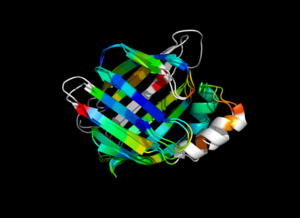 1cbs and 1hmt aligned and colored by RMSD. Dark blue is good alignment, higher deviations are in orange/yellow/red. Residues not used for alignment are colored white.
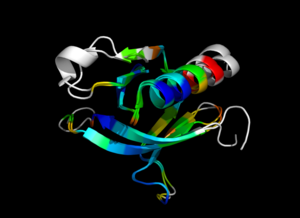 1eaz and 1fao aligned and colored by RMSD. Dark blue is good alignment, higher deviations are in orange/yellow/red. Residues not used for alignment are colored white.
